
JSON, YAML and TOML
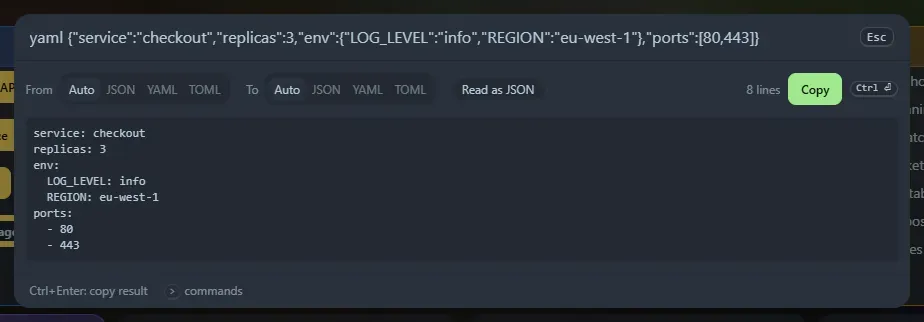
Paste a document after yaml or toml. Home Screen works out what you pasted and converts it: JSON or TOML becomes YAML, and YAML becomes JSON (for yaml); JSON or YAML becomes TOML, and TOML becomes JSON (for toml).
Commands
Section titled “Commands”| Type | Meaning |
|---|---|
yaml <text> or yml <text> |
Convert to YAML, or from YAML to JSON |
toml <text> |
Convert to TOML, or from TOML to JSON |
json2yaml, yaml2json, json2toml, toml2json, yaml2toml, toml2yaml |
Choose both formats |
The panel shows From and To tabs, so you can override the guess. Read as … tells you what was detected. Ctrl+Enter (or Copy) copies the result.
How the format is detected
Section titled “How the format is detected”JSON is tried first. Then, if the text has key = value lines or [table] headers, TOML. Otherwise YAML. JSON with comments, trailing commas or unquoted keys is read leniently, as in the JSON formatter. When a document is not valid, the message names the line.
What YAML it reads
Section titled “What YAML it reads”Configuration-style YAML: nested maps and lists, - key: value items, plain, 'single' and "double" quoted text (also across lines), [flow, lists] and {flow: maps}, | and > block text with -, + and indent indicators, comments, a leading --- and a trailing ....
Values follow YAML 1.2: null, ~ and empty are null, true and false are booleans, numbers (decimal, 0x, 0o, floats) are numbers, and everything else is text. So yes, no and on stay text. Integers too big to keep exactly stay text.
It stops with a message and a line number on things it does not support: anchors, aliases, tags (&a, *a, !!str), merge keys (<<), complex ? keys, several documents in one file, tabs used as indentation, duplicate keys, and long plain text that continues on the next line (use quotes, | or >).
What it writes
Section titled “What it writes”YAML with a two-space indent. Text that could be read as another type (true, 123, 2024-01-01, a: b, empty text) is quoted. Text with line breaks becomes a | block.
TOML is written with simple values first, then [tables] and [[arrays of tables]]. TOML has no null: null values are left out and the panel warns you which ones. A TOML document must be a map at the top, so a JSON list cannot be converted to TOML. Dates and times in TOML are kept as text. inf and nan become the words Infinity and NaN in JSON.
Everything runs in your browser. The tool is also a widget, as JSON ⇄ YAML converter and JSON ⇄ TOML converter, and copied conversions are saved in Recent.
Support the project: Buy Me a Coffee or GitHub Sponsors.