
Colour picker
Type color (or colour, or picker), or type a colour directly: #ff8800, rgb(255, 136, 0), hsl(32 100% 50%), or color rebeccapurple. Any CSS colour name works, as does modern syntax such as oklch(…).
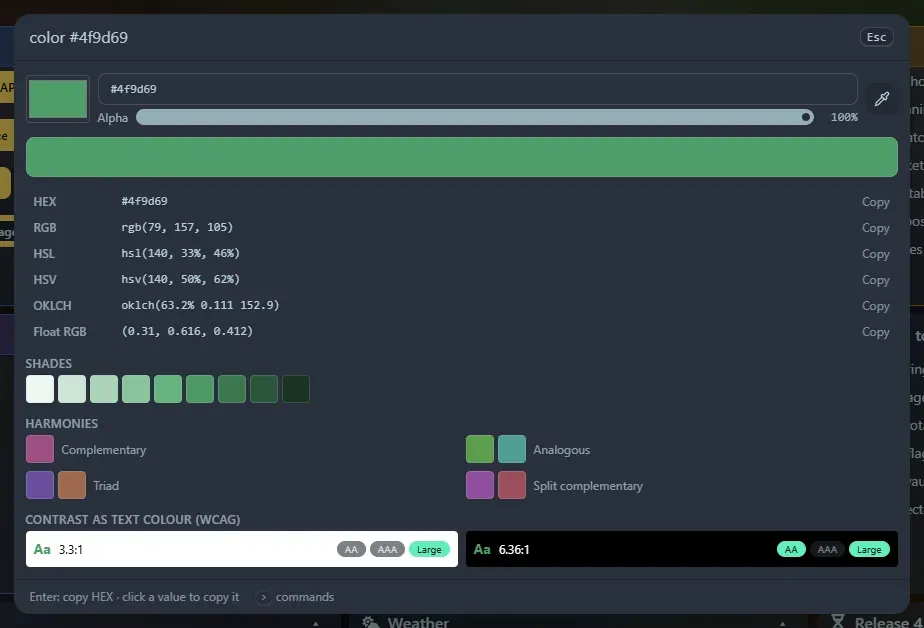
In the panel
Section titled “In the panel”- The native colour picker, a text box that accepts any of those spellings, an alpha slider and an eyedropper button (Chrome’s EyeDropper: click it, then click any pixel on screen).
- Every format, click to copy: HEX (and HEX + alpha), RGB, HSL, HSV, OKLCH and float RGB (
(1, 0.533, 0), handy for shaders). - Nine shades, and harmonies (complementary, analogous, triad, split complementary). Click any swatch to make it the current colour.
- WCAG contrast of the colour as text on white and on black, with AA, AAA and large-text badges.
Enter copies the HEX. Copied colours go to Recent with a colour swatch.
Also a widget
Section titled “Also a widget”The Colour picker widget keeps a colour on your dashboard with a Recent row of copied colours.
Support the project: Buy Me a Coffee or GitHub Sponsors.