
Number bases and bit tools
Convert a number to every base at once, turn a size into every unit, or evaluate a bit expression and see which bits are set. Everything uses exact big integers, so large values do not lose digits.
Numbers
Section titled “Numbers”| Type | Reads |
|---|---|
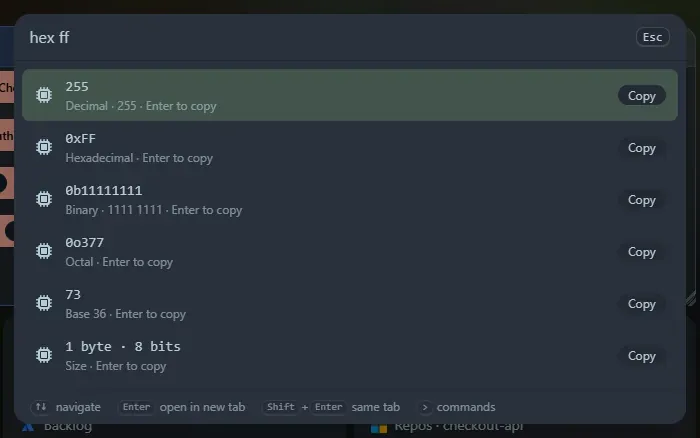
hex ff |
ff as hexadecimal |
bin 1010, oct 755, dec 255 |
Binary, octal and decimal |
base 255 |
A number with an optional prefix (0x, 0b, 0o) |
base 36 zz |
zz in any base from 2 to 36 |
0xFF, 0b1010, 0o17 |
A bare prefixed number, with no command word |
Underscores are allowed (0b1010_1010), and so is a minus sign. You get decimal (also with thousands separators), hexadecimal, binary (also grouped by four), octal, base 36 and the size in bytes and bits. For a negative number the two’s complement is shown for the widths it fits in: 8, 16, 32 and 64 bits.
A bare 255 is deliberately not a trigger, so ordinary numbers still go to the calculator.
Byte sizes
Section titled “Byte sizes”bytes 1536000 or bytes 1.5 GiB: you get the exact byte count, a human-readable form in both SI (powers of 1000: KB, MB, GB) and IEC (powers of 1024: KiB, MiB, GiB), every unit that is not tiny, and the number of bits. Units are b, kb, mb, gb, tb, pb and kib, mib, gib, tib, pib; a bare k, m, g or t means the binary size. To convert between two units directly, use the unit converter.
bits <expression> calculates with the C operators: | ^ & << >> ~ + - * / % and parentheses, on numbers in any base. Examples: bits (1<<3)|(1<<5), bits 0xF0 & 0x3C, bits ~0.
bits set 0 2 5 builds a value from bit positions (0 is the lowest bit). The result is shown in every base, with a row listing the bits that are set.
Enter copies a row. The tools are also widgets: Number base converter, Byte size converter and Bit calculator.
Support the project: Buy Me a Coffee or GitHub Sponsors.