
Cron expression explainer
Paste a cron expression, or type cron <expression> (also crontab). A bare expression such as 0 9 * * 1-5 or a macro such as @daily is recognised on its own, as long as it is clearly cron (it has a * or / and every field is valid).
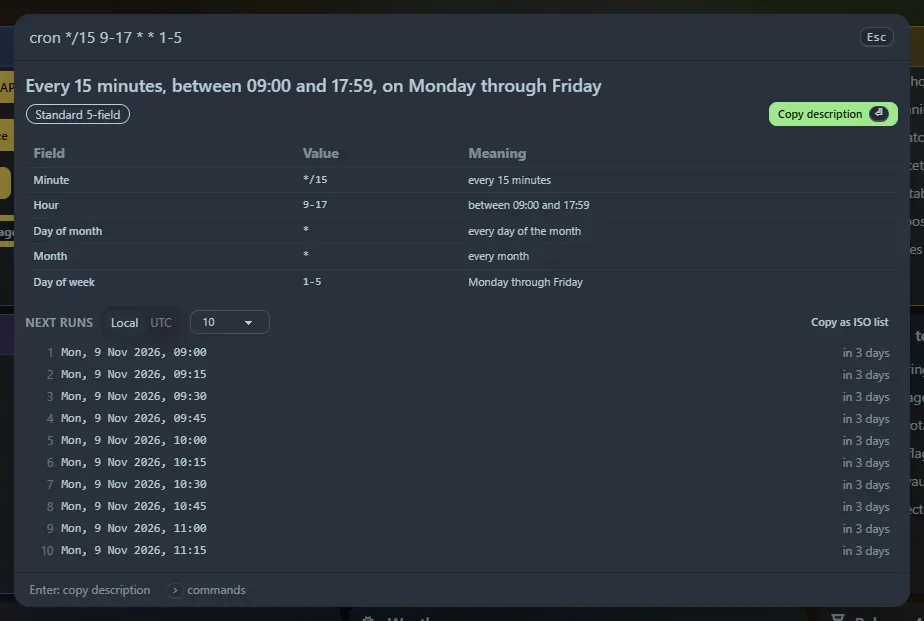
What you get
Section titled “What you get”- A plain-English description:
*/15 9-17 * * 1-5becomes “Every 15 minutes, between 09:00 and 17:59, on Monday through Friday”. - A field-by-field table with each field’s meaning.
- The next 5, 10 or 25 run times, in your local time or UTC, each with a relative time (“in 3 hours”).
- Precise error messages that name the bad field, for example “Minute: 61 is out of range for minute (0–59)”.
Supported syntax
Section titled “Supported syntax”*, lists (1,15), ranges (9-17), steps (*/5, 10-40/10, 5/15), month and weekday names (JAN, MON-FRI), ?, the macros @yearly @monthly @weekly @daily @midnight @hourly and @reboot, and the Quartz specials L (last day), LW, L-3, 15W (nearest weekday), 5L (last Thursday) and 6#3 (third Friday).
When both day-of-month and day-of-week are set, classic cron runs on either match, and the panel says so.
Five, six and seven fields
Section titled “Five, six and seven fields”Five fields are standard cron and seven are Quartz. Six fields are ambiguous, so the panel offers a switch: Seconds first · Spring (day of week 0–7, Sunday is 0 or 7), Seconds first · Quartz (1–7, Sunday is 1) or Year last · AWS (EventBridge, 1–7 with Sunday as 1).
Enter copies the description. Copied expressions appear in Recent.
Support the project: Buy Me a Coffee or GitHub Sponsors.