
Web search
Type the name of an engine, then what to search for, and press Enter. The search opens in a new tab (Shift+Enter uses the current one).
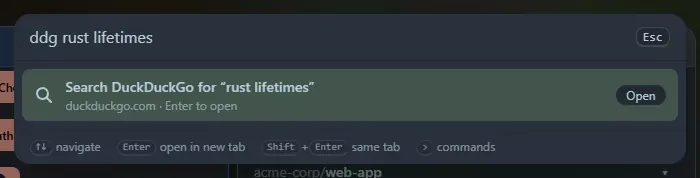
google rust lifetimes opens Google with that search. search rust lifetimes lists every engine, so you can choose.
The engines
Section titled “The engines”| Words | Opens |
|---|---|
google, g |
|
bing |
Bing |
duckduckgo, ddg |
DuckDuckGo |
brave |
Brave Search |
ecosia |
Ecosia |
startpage |
Startpage |
yahoo |
Yahoo |
kagi |
Kagi |
images, gimages |
Google Images |
maps, gmaps |
Google Maps |
translate |
Google Translate (to English) |
youtube, yt |
YouTube |
wikipedia, wiki |
Wikipedia (English) |
github, gh |
GitHub |
stackoverflow, so |
Stack Overflow |
mdn |
MDN Web Docs |
npm |
npm |
crates, cratesio |
crates.io |
docsrs |
docs.rs |
pypi |
PyPI |
reddit |
|
hn, hackernews |
Hacker News (Algolia search) |
amazon |
Amazon (amazon.com) |
imdb |
IMDb |
wolfram, wa |
Wolfram Alpha |
Good to know
Section titled “Good to know”- The search text must come after the word:
googlealone does nothing, and the word must be the first thing you type. - Home Screen only builds the address. The search engine sees what you search for when the new tab opens, as with any search. Nothing is sent before you press Enter.
- The text is encoded safely, so
c++ & rustand characters such as#and&reach the engine as typed. - Opened searches are saved in Recent, so you can repeat them.
The tool is also a widget, Web search: type what to look for and click an engine. The list of engines is built in; custom engines may come later.
Support the project: Buy Me a Coffee or GitHub Sponsors.