
chmod and umask
Type chmod for an editor, or chmod 755 to start from a mode. Tick the boxes or type the octal, and copy the command.
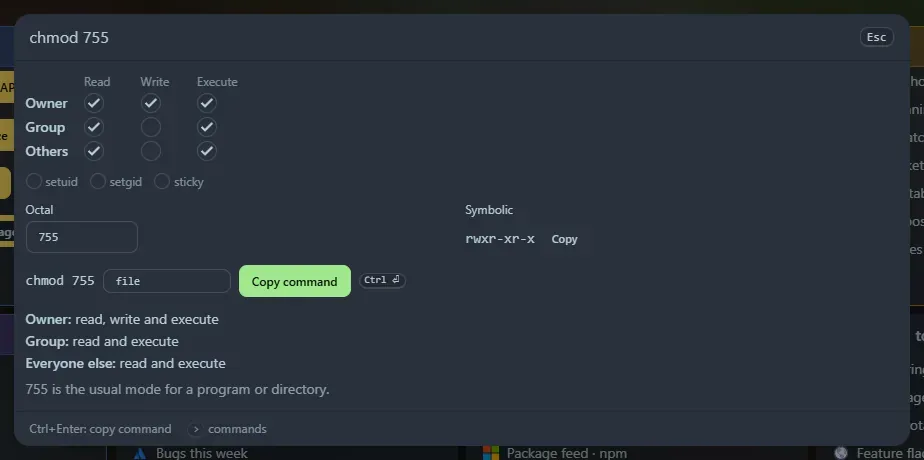
The editor
Section titled “The editor”- A grid of read, write and execute for owner, group and others, plus setuid, setgid and sticky.
- The octal field (type
644,0755or4755) and the symbolic form (rwxr-xr-x), each kept in step with the boxes. - A command such as
chmod 755 file, with a box for the file name. Ctrl+Enter copies it. - Plain English underneath: Owner: read, write and execute, and a note for well-known modes (
644is the usual mode for a file,777is rarely a good idea).
What you can type
Section titled “What you can type”| Type | Means |
|---|---|
chmod 755, chmod 0644, chmod 4755 |
An octal mode |
chmod rwxr-xr-x, chmod -rw-r--r-- |
A symbolic mode (an ls -l string, with or without the file type) |
chmod u+x,g-w,o=r |
Symbolic clauses, applied to nothing (000) |
chmod 644 u+x |
A mode followed by clauses |
umask 022 |
The permissions new files and directories get |
Clauses work like chmod: u, g, o and a for who, +, - and = for what, and r, w, x, X, s, t or another class (g=u). No umask is applied when the “who” is left out; everything is treated as a.
umask 022 shows 644 for new files (they start from 666) and 755 for new directories (they start from 777). Any three octal digits work.
Everything is worked out in your browser. Copied commands are saved in Recent. The tools are also widgets: chmod calculator and umask calculator.
Support the project: Buy Me a Coffee or GitHub Sponsors.