
Markdown previewer
Type md <markdown> (or markdown …) and the preview renders as you type. Plain md offers an example to start from.
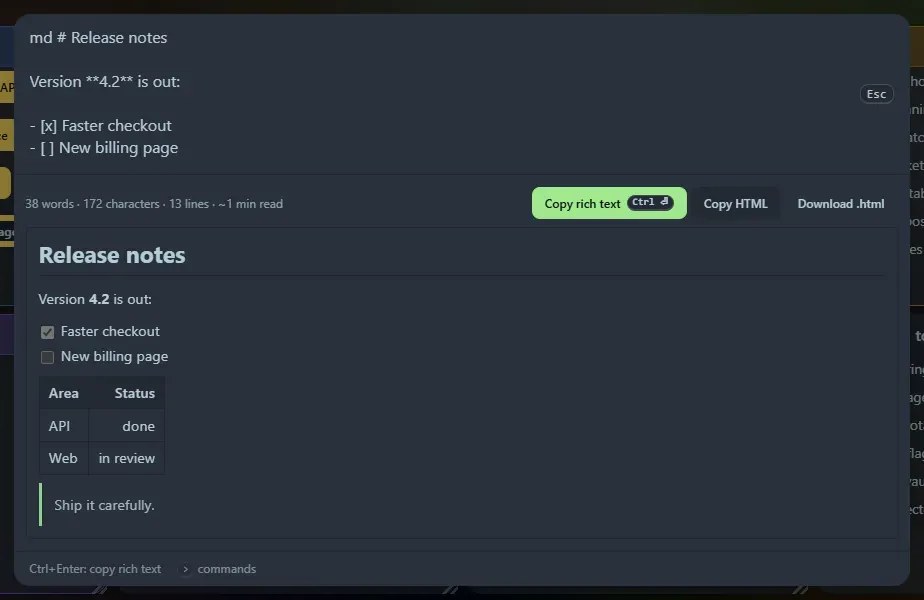
What it renders
Section titled “What it renders”GitHub-flavoured Markdown: headings (with working #anchor links), bold, italic, strikethrough, inline code, fenced and indented code blocks, block quotes, ordered, unordered, nested and task lists, tables with column alignment, links, images, horizontal rules and line breaks. A status line shows words, characters, lines and an estimated reading time.
Copying
Section titled “Copying”- Copy rich text (Ctrl+Enter): the formatted result goes on the clipboard, so it pastes with its formatting into email, Google Docs or Word, with the plain Markdown as the fallback.
- Copy HTML: the markup as text.
- Download .html: a standalone page.
Safe by construction
Section titled “Safe by construction”The Markdown is parsed into a token tree and turned into page elements directly, so no HTML is ever injected. Raw HTML in your Markdown (<script>, <div>, <img onerror=…>) is shown as text and counted, and links and images with javascript: or other unsafe addresses are dropped. Images with http(s) addresses are loaded from the internet when previewed. Footnotes and maths are not supported.
Copied documents of up to 40 KB appear in Recent.
Support the project: Buy Me a Coffee or GitHub Sponsors.