
Curl runner
Paste a curl command, for example one copied from Chrome DevTools → Network → right-click a request → Copy → Copy as cURL (bash). The launcher lays it out and, when you press Enter, runs it and shows the response.
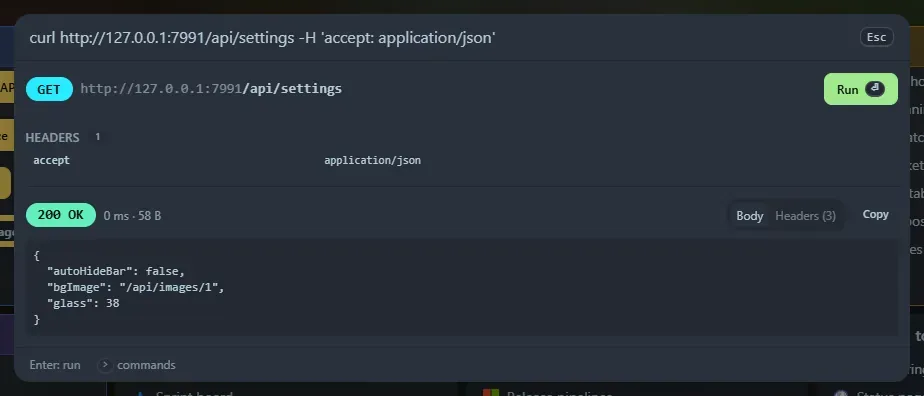
What you see
Section titled “What you see”- The method and URL.
- Query parameters and headers as tables. Headers curl would add itself are marked implied.
- The body, pretty-printed if it is JSON, or a table if it is a form.
- Badges for follow-redirects, insecure TLS, basic auth and timeout.
- After Enter: a coloured status, the time and size, a Body tab (JSON pretty-printed) and a Headers tab, and a Copy button.
Supported options
Section titled “Supported options”-X, -H, -d / --data-raw / --data-binary / --data-urlencode, --json, -u, -A, -e, -b, -L, -k, -I, -G, -m, --url, and bundles like -sSL. Multipart forms (-F) and -d @file show a warning and cannot be run.
The tables are read-only: to change something, edit the command text and the view updates.
Limits
Section titled “Limits”- Responses over 2 MB are truncated, and binary responses are not displayed.
- Only
http://andhttps://URLs work. The default timeout is 30 seconds.
Security
Section titled “Security”The request is made by the server, because browsers cannot call arbitrary sites (CORS). It runs from your machine with your network access, using whatever URL, headers and credentials are in the command.
- The
/api/runendpoint only accepts requests from this page opened vialocalhostor127.0.0.1. Other websites and DNS-rebinding tricks get a403. - Redirects are followed only with
-L. TLS certificates are checked unless the command has-k. - Commands you run are saved in Recent, in your browser, in plain text. Tokens in the command are saved with it.
Support the project: Buy Me a Coffee or GitHub Sponsors.