
URL and HTML encoding
Type url followed by some text to encode or decode it. If the text is a URL, or a list of key=value pairs, you also get a table of its parts.
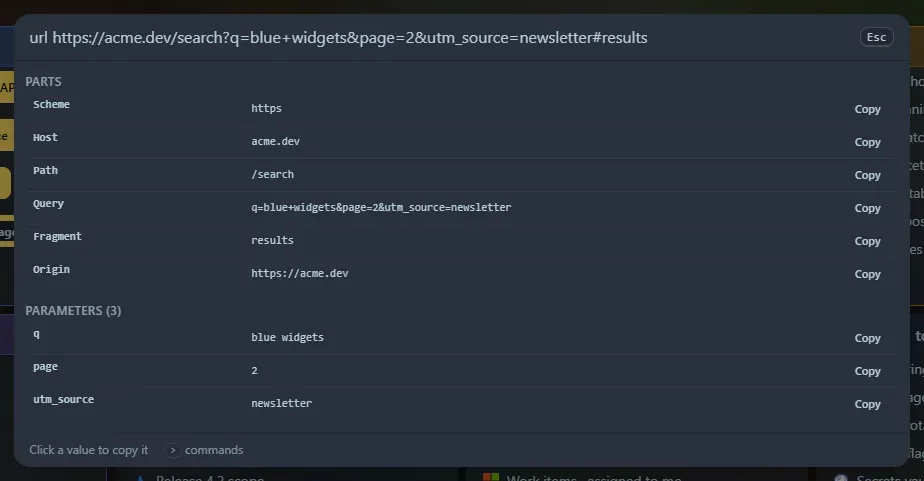
Commands
Section titled “Commands”| Type | You get |
|---|---|
url <text> |
URL-encoded and URL-decoded versions, plus a table when the text is a URL or query string |
urlencode <text> / urldecode <text> |
Only the encoded, or only the decoded, form |
html <text> |
HTML-escaped and HTML-decoded versions |
htmlencode <text> / htmldecode <text> |
Only one direction |
qs <url or query string> |
The table only. query works too |
Enter copies the selected row. In the table, click Copy next to any value.
URL encoding
Section titled “URL encoding”- Component encoding (what
encodeURIComponentdoes) escapes everything except letters, digits and- _ . ! ~ * ' ( ). Use it for a single value inside a URL. - Whole URL encoding keeps
: / ? & = #so the address still works, and only escapes spaces and other unsafe characters. - Decoding shows a second version with
+turned into a space, the way HTML forms write query strings. Text that is not valid percent-encoding (a%without two hex digits) is reported instead of being guessed.
The table
Section titled “The table”For https://user:pw@example.com:8080/a%20b?x=1&y=two+words#top it shows scheme, user, host, port, path, query, fragment and origin, then every parameter decoded. A password is hidden as ••••. A key that appears more than once is marked ×. You can paste a query string alone (?a=1&b=2 or a=1&b=2).
HTML entities
Section titled “HTML entities”- Escaping changes
& < > " 'into& < > " '. A second row also writes everything outside plain ASCII as numeric entities (ébecomesé). - Decoding reads numeric (
A) and hex (A) entities and about forty common named ones ( ,©,…,—, arrows, quotes). Names it does not know are left as they are.
Everything is worked out in your browser; nothing you type is sent anywhere. Copied rows are saved in Recent. Both tools are also widgets: URL encoder and parser and HTML entities.
Support the project: Buy Me a Coffee or GitHub Sponsors.