
Open Graph viewer
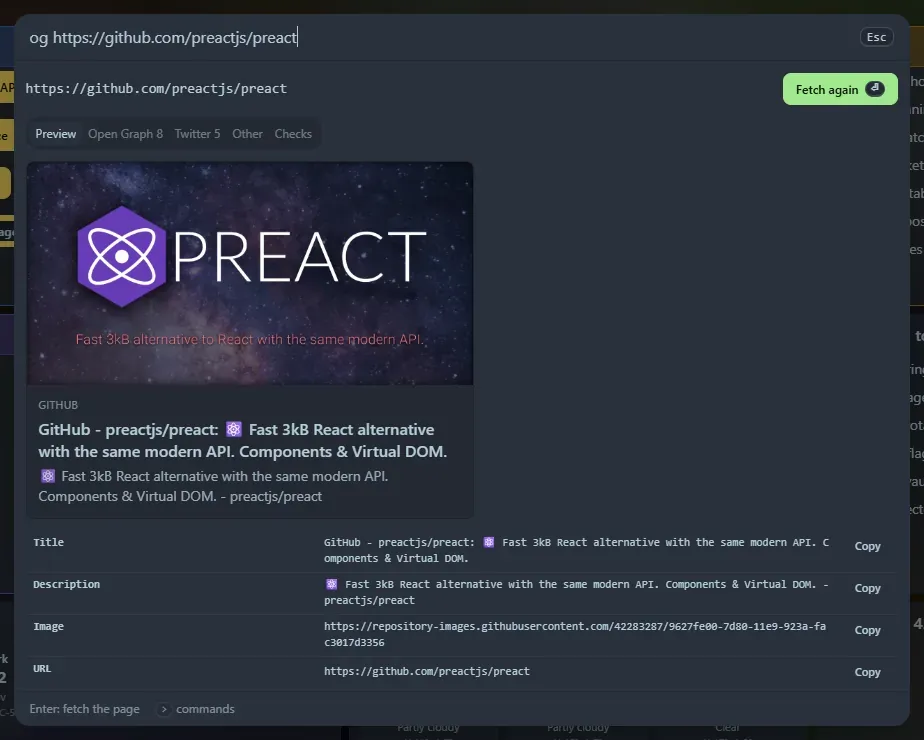
Type og and a web address. A panel opens, and when you press Enter Home Screen fetches the page and shows how it will look when shared in chat apps and on social sites.
Using it
Section titled “Using it”og https://example.com/article(the scheme is optional:og example.commeans https).- Press Enter, or Fetch. Nothing is fetched while you type.
- Tabs: Preview (the card, plus title, description, image, address, site and type), Open Graph (every
og:,article:,video:,music:and similar tag), Twitter (everytwitter:tag), Other (page title, canonical link, description, robots, theme colour, icons and feeds) and Checks. - Copy next to any value copies it. Fetched addresses are saved in Recent.
Checks
Section titled “Checks”A list of what is set and what to improve: whether og:title, og:description, og:image, og:url and og:type are present, whether the image address is relative or not https, whether the image size and a description for it are given, whether twitter:card is set, titles and descriptions that are long enough to be cut, and a canonical link that differs from og:url.
How it works, and what to know
Section titled “How it works, and what to know”- The page is fetched by your Home Screen server, the same way as in the curl runner, because browsers are not allowed to read other sites. It follows redirects, waits up to 20 seconds, reads up to 2 MB, and checks certificates. It identifies itself as
HomeScreen-OpenGraph. - It only works from a page opened via
localhost,127.0.0.1or a name listed in--allowed-hosts, like the curl runner. See Options. - The preview picture is loaded by your browser straight from the site that owns it, after you press Fetch, without sending a referrer.
- Pages built entirely by JavaScript, and sites that refuse requests that do not come from a browser, give little or an error such as
403. The tags you see are what the server was sent, which is also what most sharing bots see. - Relative addresses are resolved against the page address (or its
<base>tag). The address after redirects is not reported by the server.
It is also a widget, Open Graph viewer: type the address in its box and press Fetch.
Support the project: Buy Me a Coffee or GitHub Sponsors.