
CSV ⇄ JSON
Copy rows from a spreadsheet (they arrive tab-separated) or paste CSV straight into the launcher. Multi-line data where every line has the same number of columns is recognised on its own. You can also type csv (or tsv) followed by the data.
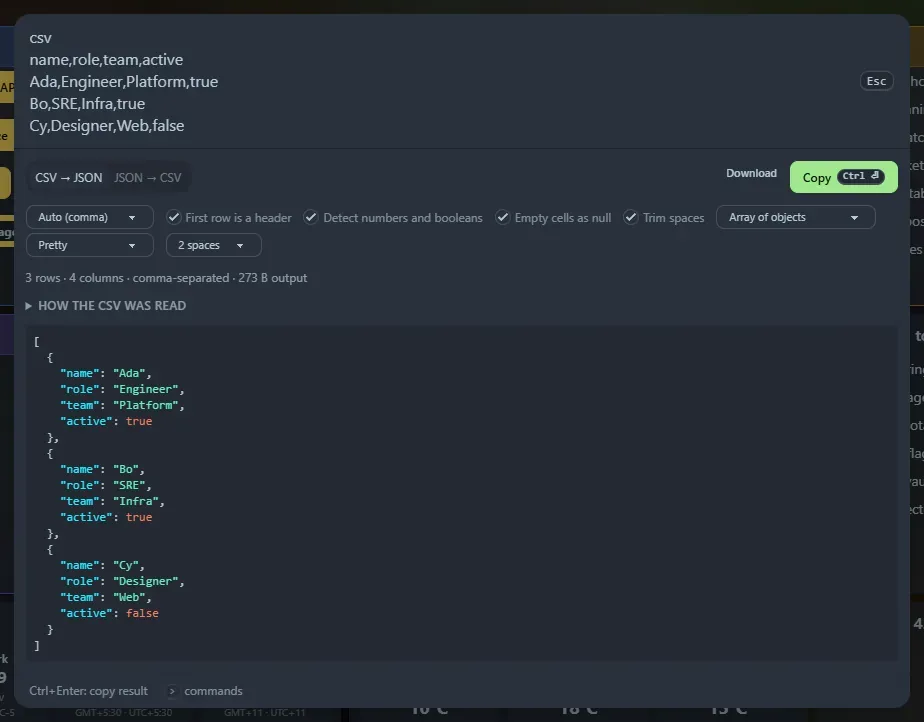
CSV → JSON
Section titled “CSV → JSON”- Delimiter: auto-detects comma, tab, semicolon and pipe, or choose.
- First row is a header, or not.
- Detect numbers and booleans (leading zeros like
007and huge integers stay text). - Empty cells as
null, and trim spaces. - Shape: array of objects, array of arrays, or keyed by first column.
- Output: pretty (2 or 4 spaces, tabs), minified or JSON Lines.
Quoted fields, doubled quotes, line breaks inside quotes, Windows line endings and a byte-order mark are all handled. Duplicate or empty headers are renamed (a_2, column_3), and ragged rows are reported. A collapsible preview shows how the CSV was read.
JSON → CSV
Section titled “JSON → CSV”Paste JSON after csv, or press → CSV in the JSON formatter. An array of objects becomes one row each, with the union of all keys as columns. Nested objects are flattened to a.b columns (optional) and arrays are written as JSON text. Choose the delimiter, header row and whether to quote every field.
Ctrl+Enter (or Copy) copies the result, and Download saves data.json, data.jsonl or data.csv.
Support the project: Buy Me a Coffee or GitHub Sponsors.