
HTTP reference
Quick answers to “what does 409 mean?”, “what does Vary do?” and “what is the MIME type for .webp?”. The reference is built in, so it works offline.
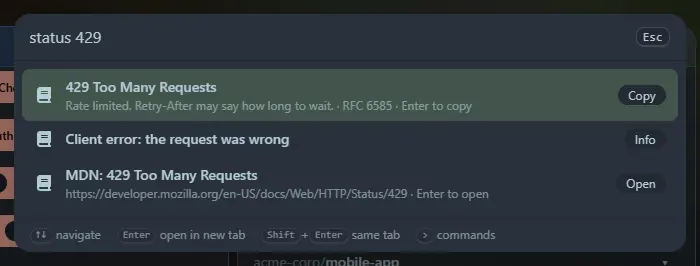
Status codes
Section titled “Status codes”| Type | Shows |
|---|---|
http 404 or status 404 |
The code, what it means, where it is defined, and a link to its MDN page |
status 4xx or status 4 |
Every code of that class, introduced with what the class means |
status not found, status redirect, status rate limit |
Codes whose name or meaning matches, best first |
http |
The codes people look up most |
About seventy codes are covered, including the WebDAV ones and a few that are not part of the HTTP standard but common: 499 (nginx) and 520 to 526 (Cloudflare). Those are marked as such.
Headers
Section titled “Headers”header content-type or headers cache finds a request or response header by name (case, dashes and spaces do not matter), or by a word from what it does. Each result is a ready-to-copy line with an example value, and says whether it belongs to requests, responses or both. If one header matches, a link to its MDN page is added. About seventy are covered: caching, content negotiation, CORS, cookies, security headers and proxy headers.
Media types
Section titled “Media types”mime png, mime .json, mime image/png or mime font finds the media type for a file extension, or the extensions for a type, or types that match a word. About eighty are covered, including web formats, images, audio, video, documents, archives and fonts. A few types have no file extension, such as multipart/form-data and text/event-stream.
Enter copies a row (the MDN rows open the page). The lookups are also widgets: HTTP status codes, HTTP headers and MIME types.
Support the project: Buy Me a Coffee or GitHub Sponsors.