
Text diff
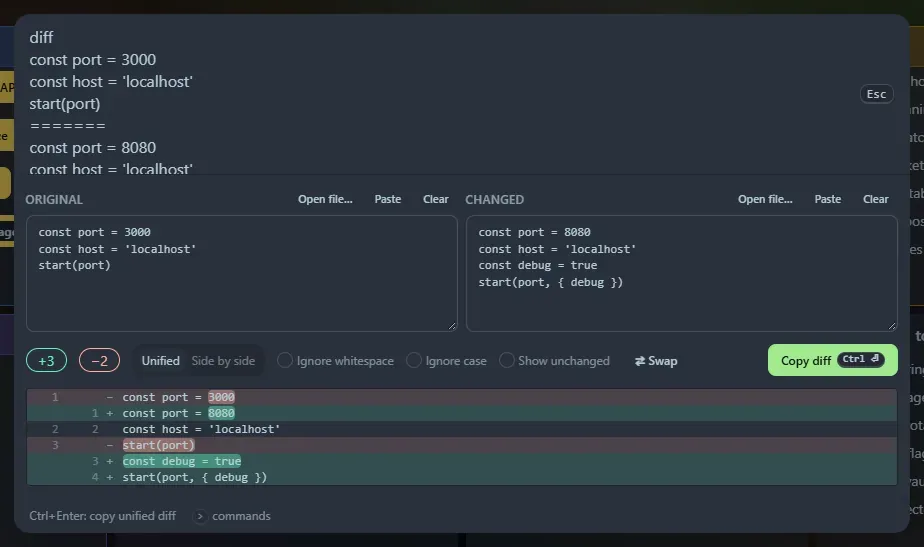
Type diff to open two boxes, Original and Changed, with Paste, Clear and Swap buttons. You can pre-fill both from the launcher: diff, the old text, a line containing only ======= (the git conflict marker), then the new text.
What you get
Section titled “What you get”- A line diff (Myers algorithm) with the changed words highlighted inside modified lines.
- Unified or Side by side view, with long runs of unchanged lines collapsed. Click a ”⋯ N unchanged lines” bar to expand it, or tick Show unchanged.
- Options to ignore whitespace and ignore case.
- A
+added −removedsummary, or “Identical”.
Ctrl+Enter (or Copy diff) copies a standard unified diff (---/+++/@@ hunks with three lines of context) that tools like patch and git apply understand.
Limits
Section titled “Limits”Very different texts (more than about 2,000 edits) are shown as a straight replacement instead of being aligned. The on-screen view shows the first 4,000 diff lines; the copied diff includes everything.
Support the project: Buy Me a Coffee or GitHub Sponsors.