
Import bookmarks
☰ → Import Bookmarks turns a Chrome export into tiles. Afterwards, Clean up links finds duplicates and dead links across everything you imported.
- In Chrome open the Bookmark Manager (Ctrl+Shift+O), then ⋮ → Export bookmarks. This saves an HTML file.
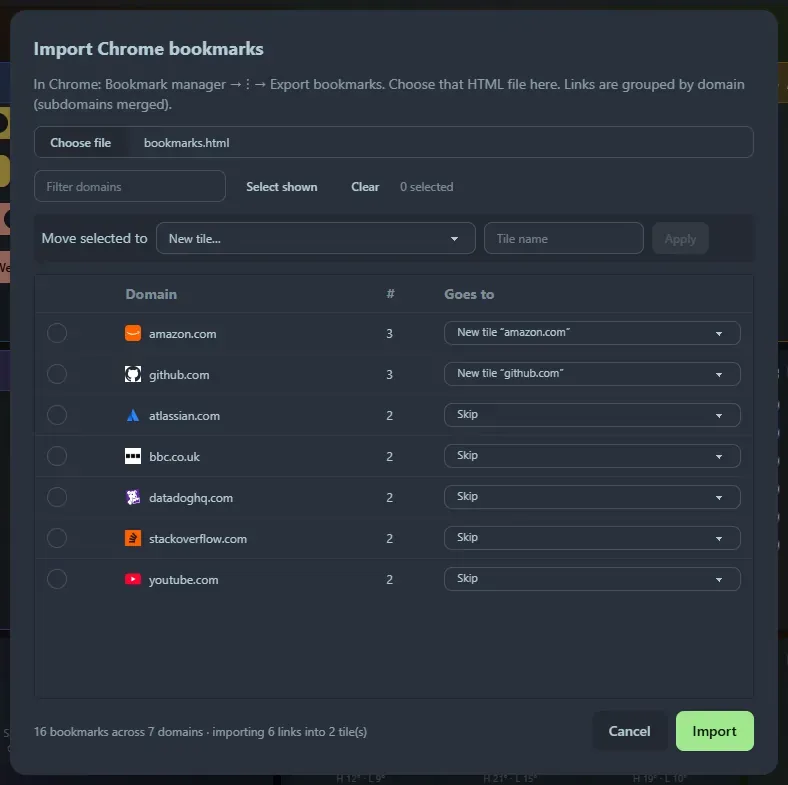
- In the dialog, choose that file. Links are grouped by domain with subdomains merged:
docs.github.comandgithub.comland together, and multi-part suffixes such asbbc.co.ukare handled. - Decide where each group goes. Use the dropdown on a row, or tick several rows and use Move selected to: a new tile with a name you choose, a tile per domain, or an existing bookmarks tile. Everything starts as Skip, so you only import what you pick.
- Click Import. Duplicate URLs are skipped, and groups sent to the same new tile name are merged into one tile.
Support the project: Buy Me a Coffee or GitHub Sponsors.