
The launcher
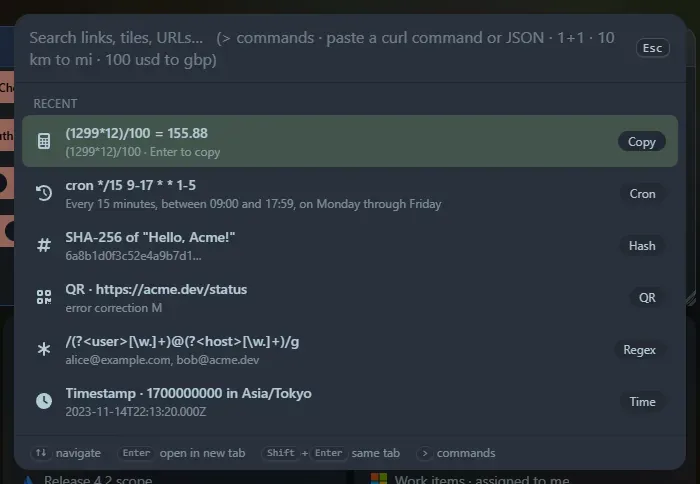
Press Ctrl+P (or Ctrl+K, or ☰ → Launcher) from the dashboard. A search box opens in the middle of the page and Esc closes it. The box grows when you paste several lines.
How it works
Section titled “How it works”- Navigate with ↑ ↓. Enter opens a link in a new tab, Shift+Enter in the current tab. Clicking works too.
- With an empty box it shows your Recent items. Whatever you copy or run in a tool is added there, and choosing a recent item puts it back in the box so you can use it again.
- Many tools are triggered by what you type. If your text does not look like any tool, it is a normal search.
- Some tools show a result list (press Enter to copy a row). Others open a panel that takes over the results area, with its own buttons and options.
Everything it can do
Section titled “Everything it can do”| Group | Tools |
|---|---|
| Search and commands | Search everything · Commands |
| Calculators and converters | Calculator · Units · Currency · Timestamps · Number bases and bits |
| Developer tools | Curl runner · JSON · JSON, YAML and TOML · CSV ⇄ JSON · Regex · Text diff · Cron · Markdown · chmod and umask · Text case and counts |
| Web and network | URL and HTML encoding · IP and CIDR · HTTP reference · Open Graph viewer · Web search · Can I use · Ping, traceroute and DNS |
| Security and encoding | Password generator · Hashes · Base64 · UUIDs · JWT decoder |
| Media and design | QR codes · Colour picker · Lorem ipsum |
Privacy
Section titled “Privacy”The tools run in your browser. Only a few features contact an outside service (currency rates, the Can I use data, and the server-side curl runner and Open Graph viewer), and web search opens the engine you pick; each page says so. See Privacy and security.
Support the project: Buy Me a Coffee or GitHub Sponsors.