
Your first five minutes
A quick tour that takes about five minutes.
1. Add a tile
Section titled “1. Add a tile”Click + Add tile above the grid (or choose it from the ☰ menu at the top right). Pick a type:
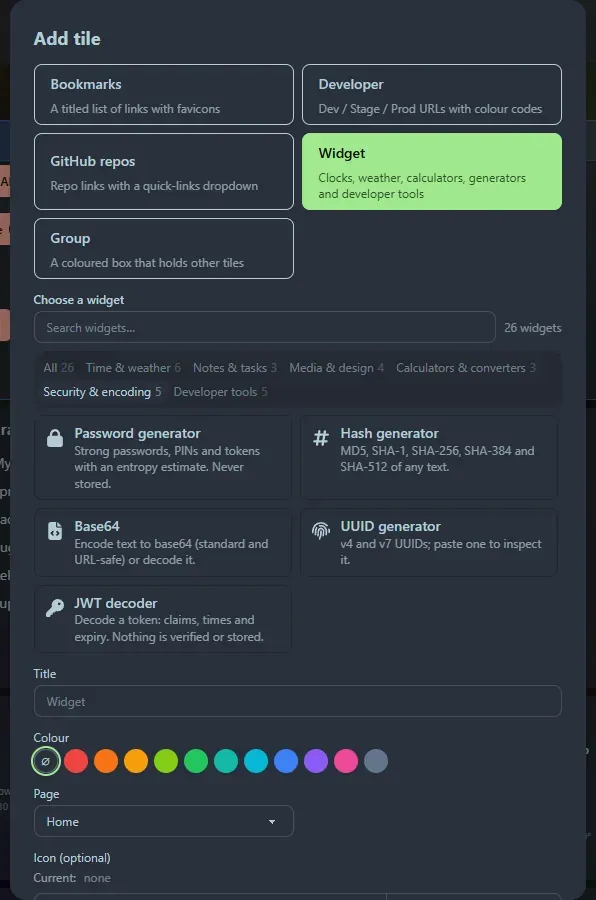
- Bookmarks: a titled list of links.
- Developer: services with Dev, Stage and Prod links (Prod is red).
- GitHub repos: repositories with a quick-links dropdown.
- Widget: pick from the gallery, filtered by category or search.
Give it a title and, if you like, an icon, then Save. The tile appears at the bottom; drag it by its title bar wherever you want.
2. Import what you already have
Section titled “2. Import what you already have”If your browser bookmarks are the thing you are trying to replace, use ☰ → Import Bookmarks. Links are grouped by domain so you can send each group to a tile in a few clicks. See Import bookmarks.
3. Try the launcher
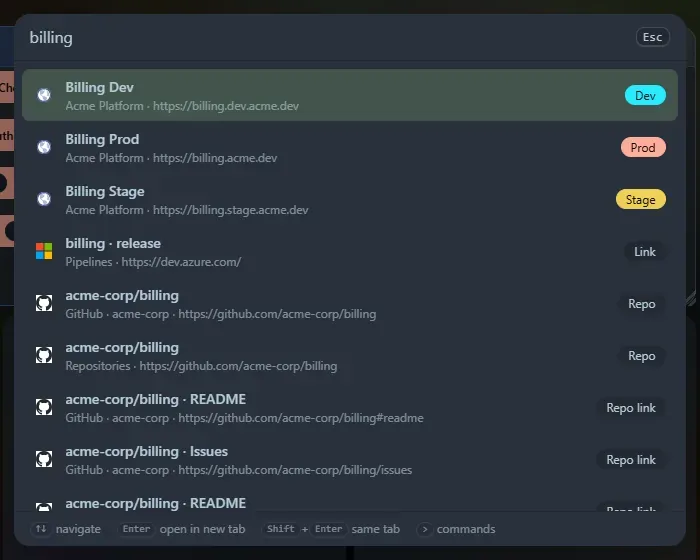
Section titled “3. Try the launcher”Press Ctrl+P. Start typing a tile or link name. Then try:
1+172 f to cuuid>to see the commands
4. Make it yours
Section titled “4. Make it yours”☰ → Settings lets you pick a background colour or image, turn the title bar auto-hide on or off, and adjust the glass effect. See Settings.
5. Make it your home page
Section titled “5. Make it your home page”Follow Set it as your home page so it opens when you start your browser.
Support the project: Buy Me a Coffee or GitHub Sponsors.