
Backlog
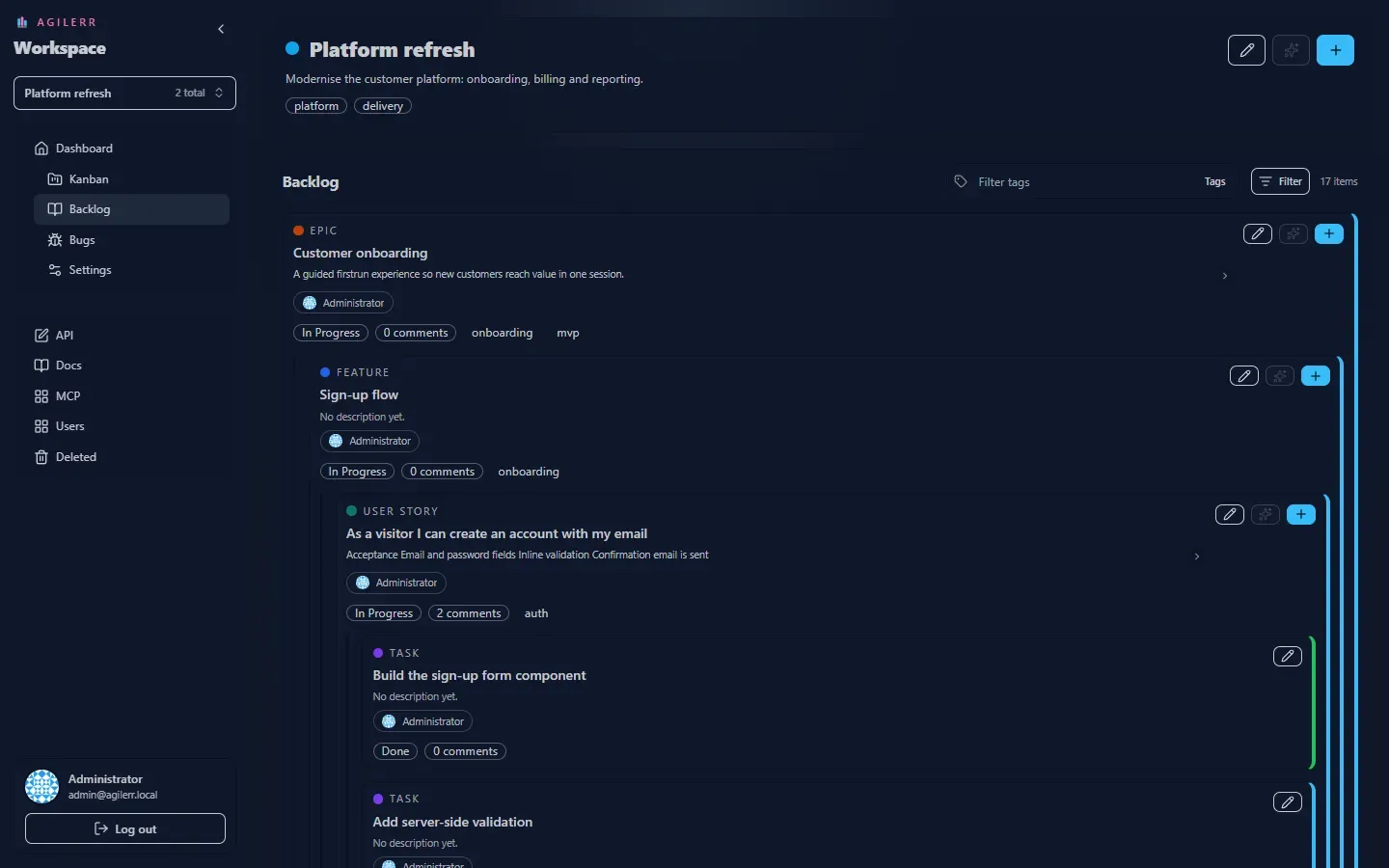
The Backlog shows the whole work breakdown as a nested tree: epics contain features, features contain user stories, stories contain tasks.
Reading a card
Section titled “Reading a card”Each card shows its type, title, a short description (collapsed by default), the assignee, the status, a comment count and its tags. The coloured bar on the right edge reflects the status. Use the chevron to expand a long description.
Card actions
Section titled “Card actions”| Button | Does |
|---|---|
| Pencil | Edit item (needs Edit Units) |
| Sparkle | AI Add under this item (needs Add with AI and OpenAI configured) |
| Plus | Add child of the next level down |
Filtering
Section titled “Filtering”- Type filter: show only epics, features, stories or tasks.
- Tag filter: type in the tag bar to narrow the tree to items with those tags.
When you select lower levels without their parents, Agilerr keeps the missing parents visible as faded structural nodes, so every item still has its context.
The header shows how many items match, for example “17 items”.
Adding work
Section titled “Adding work”Press + at the top (or Ctrl+A) to add an item in the current context, or use a card’s own + to add a child. See Add and edit items.
Support the project: Buy Me a Coffee or GitHub Sponsors.