
Scripts and CI
pkgr is an interactive tool. Without a terminal there is nothing to pick from, so it does the next most useful thing.
Redirected input or output
Section titled “Redirected input or output”If stdin or stdout is not a terminal (a pipe, a file, a CI runner), pkgr prints what is available and exits with code 1:
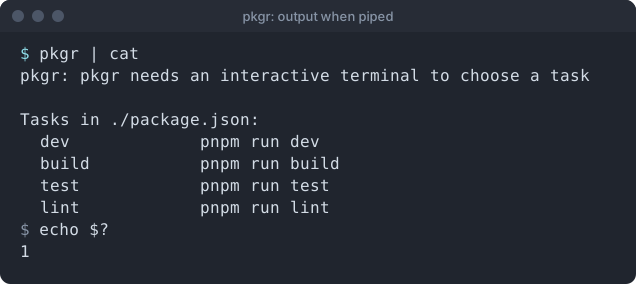
The output goes to stderr and shows the command that each task would run. It is a quick way to see what a project offers.
Not for CI
Section titled “Not for CI”In automation, call your package manager directly (pnpm run build). pkgr exists to save typing and memory at a human keyboard, not to replace a build script.
Exit codes
Section titled “Exit codes”| Code | Meaning |
|---|---|
| the task’s own code | the task ran; pkgr passes its exit code through |
0 |
-version or -h |
1 |
usage error, unreadable or invalid manifest, no terminal, or the task could not be started |
130 |
you cancelled at the picker |
Because pkgr returns the task’s own code, you can chain it:
pkgr && echo "task succeeded"Support the project: Buy Me a Coffee or GitHub Sponsors.