
Keyboard
| Key | Action |
|---|---|
| ↑ / ↓ | Move the highlight. It stops at the first and last row. |
| Home / End | Jump to the first or last row. |
| Page Up / Page Down | Same as Home and End. |
| any character | Add it to the filter. |
| Backspace | Remove the last filter character. |
| Enter | Run the highlighted task. |
| Esc | Cancel. Nothing runs. Exit code 130. |
| Ctrl+C | Same as Esc while the picker is open. |
Anything else, such as mouse reports or bracketed-paste markers, is swallowed whole and does not end up in the filter.
Filtering
Section titled “Filtering”The filter is a case-insensitive substring match over both the task name and its command. Typing te matches test by name and anything whose command contains te.
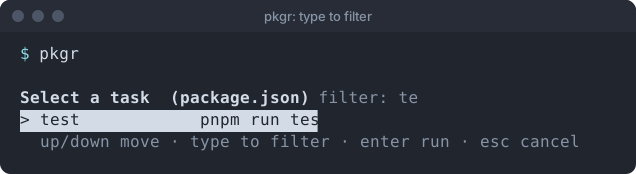
The title line shows the active filter. If nothing matches, the list says so and Enter does nothing.
Case is folded for ASCII only. étape will not find ÉTAPE, though ÉTAPE does find étape. This is a deliberate size trade, covered in Size.
Long lists
Section titled “Long lists”When there are more tasks than rows that fit the screen, the list scrolls and shows ... N more beneath it. The highlight index always refers to the filtered view, and pkgr maps it back to the original task when you press Enter, so the right script runs.
While a task runs
Section titled “While a task runs”After you press Enter the picker is gone and the terminal is returned exactly as it was. From then on Ctrl+C goes to the task, not to pkgr.
Support the project: Buy Me a Coffee or GitHub Sponsors.