
Quick start
This takes about a minute once pkgr is installed.
1. Go to a project
Section titled “1. Go to a project”Any directory with a package.json (with a scripts section), a deno.json or a deno.jsonc (with tasks):
cd my-project2. Run pkgr
Section titled “2. Run pkgr”pkgr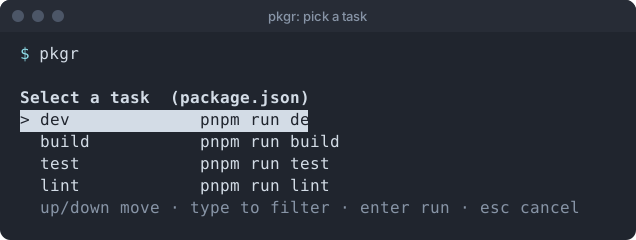
The title tells you which manifest it read. Each row is a task name and the command behind it.
3. Choose
Section titled “3. Choose”- ↑ / ↓ move the highlight.
- Type to narrow the list.
- Enter runs the highlighted task.
- Esc cancels and runs nothing.
When you press Enter, pkgr prints the exact command it is about to run, then runs it in the foreground:
> pnpm run devThat line is copyable, so you can learn the real command and skip the picker next time.
What next
Section titled “What next”- Choosing a project to point pkgr at another folder.
- How pkgr picks the package manager.
- Keyboard reference.
- Troubleshooting if something looks wrong.
Support the project: Buy Me a Coffee or GitHub Sponsors.