
pkgr
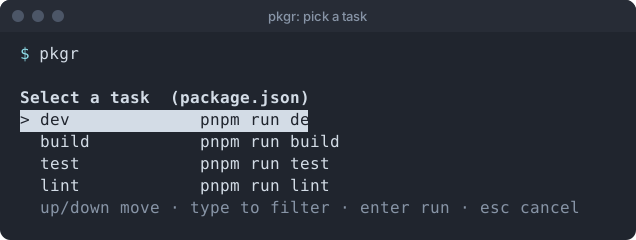
Pick a script from package.json or a task from deno.json and run it, without remembering what the project calls things.
What is pkgr?
Section titled “What is pkgr?”Choosing dev runs pnpm run dev (or npm, yarn, bun, deno task, whichever the project uses) in that project’s directory, attached to your terminal exactly as if you had typed it yourself.
- Tiny. One static binary, no runtime dependencies.
- Honest. Runs in the foreground, passes through colour and prompts, and exits with the task’s own exit code.
- Predictable. Tasks are listed in file order, and nothing runs if you cancel.
- Everywhere. Linux, Windows and macOS (Apple silicon and Intel).
Part of the Floppy Rule: every byte has to earn its place.
At a glance
Section titled “At a glance”| Size of the program | 117 KB on Linux, about 233 KB on Windows |
| Platforms | Linux, Windows, macOS |
| Dependencies you need | none: a single static binary |
| Reads | package.json, deno.json, deno.jsonc |
| Current release | v0.0.2 |
See the size breakdown and how it is built.
Where to next?
Section titled “Where to next?”- New here? Read about pkgr and the features.
- Ready to try it? Follow Install and the quick start.
- Using it daily? See Using pkgr, the keyboard and package managers.
- Scripting? Read the command line reference and scripts and CI.
- Want to know what is coming? See the roadmap and the release notes.
Support the project: Buy Me a Coffee or GitHub Sponsors.
Support the project: Buy Me a Coffee or GitHub Sponsors.